Verified GCAM Versions
gcamreader is regularly exercised against the full range of GCAM output
databases produced by the GCAM continuous-integration runs (GCAM 5.3 through
9.1). This page records the results of that verification, including
per-version performance figures.
Note
These results were produced on an HPC cluster using the harness in
benchmarks/version_compat/. To regenerate them, see the
Reproducing these results section below.
Test environment
Component |
Value |
|---|---|
gcamreader |
|
Python |
|
Java |
Temurin OpenJDK |
Platform |
Rocky Linux 9.5 (x86_64), AMD EPYC 7282 |
Benchmark query |
Crop Land Allocation (bundled land query) |
Java heap |
|
Each version is verified through three stages: opening a local database
connection, listing the scenarios in the database
(listScenariosInDB()), and running the benchmark
land-allocation query (runQuery()). A version is
marked PASS only when all three stages succeed and the query returns data.
Compatibility matrix
All 22 versions PASS. Every GCAM release from 5.3 through 9.1 connects, lists its scenarios, and returns data for the benchmark land-allocation query.
Version |
Status |
Scenarios |
Query rows |
Scenarios (s) |
Query (s) |
|---|---|---|---|---|---|
gcam-v5.3 |
PASS |
1 |
477,356 |
1.44 |
36.63 |
gcam-v5.4 |
PASS |
1 |
477,356 |
1.51 |
40.81 |
gcam-v6.0 |
PASS |
1 |
747,054 |
1.07 |
60.19 |
gcam-v7.0 |
PASS |
1 |
653,202 |
0.79 |
38.47 |
gcam-v7.1 |
PASS |
1 |
672,408 |
0.92 |
42.20 |
gcam-v7.2 |
PASS |
1 |
672,408 |
0.91 |
53.03 |
gcam-v7.3 |
PASS |
1 |
672,408 |
0.84 |
53.78 |
gcam-v7.4 |
PASS |
1 |
672,408 |
0.89 |
42.09 |
gcam-v8.0 |
PASS |
1 |
672,628 |
2.28 |
36.38 |
gcam-v8.1 |
PASS |
1 |
678,832 |
0.79 |
35.43 |
gcam-v8.2 |
PASS |
1 |
678,832 |
0.78 |
33.55 |
gcam-v8.3 |
PASS |
1 |
678,832 |
0.80 |
48.86 |
gcam-v8.4 |
PASS |
1 |
678,832 |
0.74 |
37.06 |
gcam-v8.5 |
PASS |
1 |
678,832 |
0.73 |
34.97 |
gcam-v8.6 |
PASS |
1 |
678,832 |
0.74 |
33.24 |
gcam-v8.7 |
PASS |
1 |
678,832 |
0.83 |
41.55 |
gcam-v8.8 |
PASS |
1 |
678,832 |
0.75 |
35.47 |
gcam-v8.9 |
PASS |
1 |
678,832 |
0.86 |
38.34 |
gcam-v8.10 |
PASS |
1 |
682,594 |
0.77 |
35.91 |
gcam-v8.11 |
PASS |
1 |
682,594 |
0.84 |
35.51 |
gcam-v9.0 |
PASS |
1 |
682,594 |
0.74 |
37.86 |
gcam-v9.1 |
PASS |
1 |
682,594 |
0.81 |
37.00 |
Performance figures
Listing scenarios is consistently fast (about 0.7–2.3 seconds; the single
outlier near 2.3 s is filesystem warm-up on the first task). The
land-allocation query — which materializes 477k–747k rows — is the dominant
cost, ranging from roughly 33 to 60 seconds at -Xmx16g.
Metric (all 22 PASS versions) |
Value |
|---|---|
Scenario list time (min / max) |
0.73 s / 2.28 s |
Query time (min / max) |
33.24 s / 60.19 s |
Query time (mean) |
~40 s |
Query rows (min / max) |
477,356 / 747,054 |
Query time scales roughly with the number of rows returned: the largest
database (gcam-v6.0, 747k rows) is also the slowest query (~60 s), while the
smallest (gcam-v5.3/5.4, 477k rows) complete in the mid-30s. The query schema
used by gcamreader remains compatible across all of these versions without
modification.
Query output across versions
The number of rows the Crop Land Allocation query returns is not constant across GCAM versions. The figure below shows the row count for every version; bars are highlighted where a version changes the row count relative to the previous version.
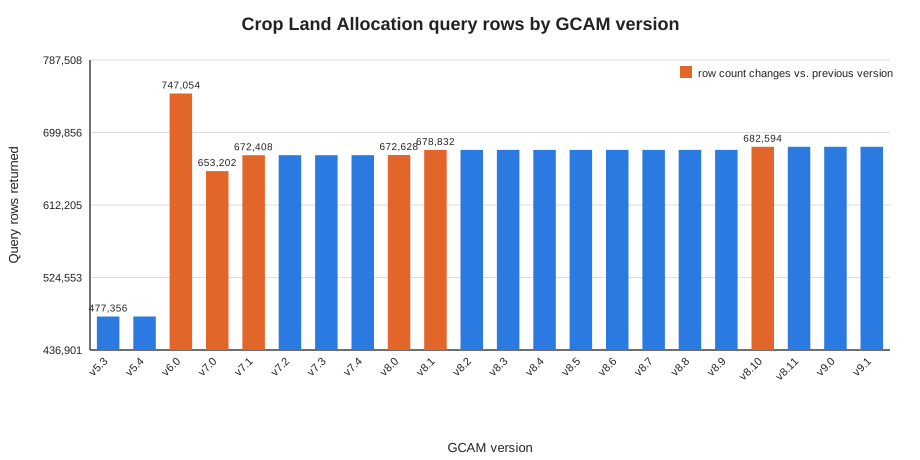
Rather than drifting randomly, the row counts fall into seven discrete tiers. Each tier is introduced by a specific GCAM release and then held stable until the next change. Note that the counts are not monotonic: the early 5.x/6.0 land representation differs structurally from the 7.x line that follows, so the count rises sharply at 6.0 and then resets when the 7.x land module is introduced.
First seen |
Rows |
Change |
Interpretation |
|---|---|---|---|
gcam-v5.3 |
477,356 |
baseline |
Earliest land representation (shared by 5.3-5.4). |
gcam-v6.0 |
747,054 |
+269,698 |
|
gcam-v7.0 |
653,202 |
-93,852 |
|
gcam-v7.1 |
672,408 |
+19,206 |
Expansion of land leaves; stable across 7.1-7.4. |
gcam-v8.0 |
672,628 |
+220 |
Minor refinement entering the 8.x line. |
gcam-v8.1 |
678,832 |
+6,204 |
|
gcam-v8.10 |
682,594 |
+3,762 |
Further land-detail expansion; stable through 9.1. |
Why the counts change
The Crop Land Allocation query (see
the bundled query) returns one row per
land leaf × year × region combination that exists in the database. The query
itself is unchanged across this study — every version runs the identical
XQuery. The row count therefore tracks the contents of each database, not the
behavior of gcamreader:
Land-representation changes. Successive GCAM releases revise the land-use representation — adding or splitting crops and land types within the 7.x → 9.x line, but also occasionally redesigning it wholesale. The sharp drop from gcam-v6.0 (747k rows) to gcam-v7.0 (653k rows) reflects exactly such a structural redesign of the land module between the 6.x and 7.x series, not a loss of data.
Structural, not noisy. Because the values move in clean step functions and stay flat between changes, the differences are structural — they coincide with land-module updates in specific GCAM releases rather than per-run noise.
Identical query semantics. The flat tiers between changes confirm that
gcamreaderextracts the same data deterministically; when two consecutive versions share a land schema (e.g., 5.3 and 5.4, or 8.1 through 8.9), they return identical counts.
The practical takeaway: a differing row count across GCAM versions is the
expected and correct result of GCAM’s evolving (and occasionally
redesigned) land representation. It is a useful signal for pinpointing exactly
which GCAM release changed the land schema, and it confirms that gcamreader
faithfully returns whatever the underlying database contains.
The figure is regenerated from the committed summary CSV with:
python benchmarks/version_compat/plot_query_rows.py \
    --csv benchmarks/version_compat/results/version_compat_summary.csv \
    --out docs/_static/query_rows_by_version.svg
Reproducing these results
The complete harness, Slurm job, and raw results live under
benchmarks/version_compat/:
run_version_check.py— runs one GCAM version and writes a JSON record.slurm/version_check.sbatch— Slurm array job (one task per version).aggregate_results.py— merges per-version JSON into the summary CSV and theVERIFIED_VERSIONS.mdreport this page is based on.results/— the committed raw outputs, including per-version JSON and the Slurm logs for each task.
The steps below reproduce the full study from scratch on an HPC cluster. Adjust the module names, paths, and Slurm account/partition for your own system as needed.
Clone the repository. Pick a location on a filesystem your compute nodes can read (e.g. your home or project space) and clone the project there.
cd $HOME/repos/github          # or any working directory you prefer
git clone https://github.com/JGCRI/gcamreader.git
cd gcamreader
Load the required modules.
gcamreadershells out to Java to query local databases, so both Python and a Java runtime must be available.module purge module load python/3.13.5 java/17.0.18 # confirm both resolve before continuing python3 --version java -version
Create and activate a virtual environment. Place it on a filesystem visible to the compute nodes (here, your home space). This path must match the
sourceline in the Slurm script.python3 -m venv $HOME/envs/gcamreader source $HOME/envs/gcamreader/bin/activate python -m pip install --upgrade pip
Install gcamreader into the environment. Installing it (rather than relying on the source tree being your current directory) makes the import work from any directory, including inside Slurm tasks.
# editable install from the cloned source
pip install -e .

# verify it resolves independently of the current directory
cd /tmp && python -c "import gcamreader; print(gcamreader.__version__)"
cd -
Point the Slurm script at your paths. Edit
benchmarks/version_compat/slurm/version_check.sbatchso thatHARNESS_DIRmatches your clone location and thesourceline matches the virtual environment you created above. Confirm theDB_ROOTandBASEX_DIRvalues match where the GCAM databases live on your system.Sanity-check a single version interactively before launching the full array:
python benchmarks/version_compat/run_version_check.py \
  --version gcam-v8.2 \
  --db-root /rcfs/projects/GCAM/gcam-ci-run \
  --query benchmarks/version_compat/queries/land_allocation.xml \
  --out /tmp/vc_test
Launch the full array and aggregate once it completes:
# run all 22 versions (one Slurm array task each)
sbatch benchmarks/version_compat/slurm/version_check.sbatch

# after the array finishes, merge results and regenerate the report
python benchmarks/version_compat/aggregate_results.py \
  --in  benchmarks/version_compat/results/per_version \
  --out benchmarks/version_compat/results
Regenerate the diagnostic figure on this page from the summary CSV:
python benchmarks/version_compat/plot_query_rows.py \
  --csv benchmarks/version_compat/results/version_compat_summary.csv \
  --out docs/_static/query_rows_by_version.svg